Reported by Weng Patrick Atokor l Journalist at Weng Global
Smartphones, computers and other internet-connected devices are increasingly exposed to cyber threats as hackers develop new ways to steal personal information, compromise online accounts and gain unauthorised access to digital systems.
Cybersecurity experts warn that weak passwords, phishing messages, outdated software and unsafe downloads can expose individuals to cyberattacks, making basic digital security practices essential for anyone using internet-connected devices.
From mobile banking and social media to business transactions and personal communication, digital devices contain sensitive information that can become a target for cybercriminals. Protecting these devices requires more than installing antivirus software, as users must also understand common online threats and take practical steps to reduce their exposure.
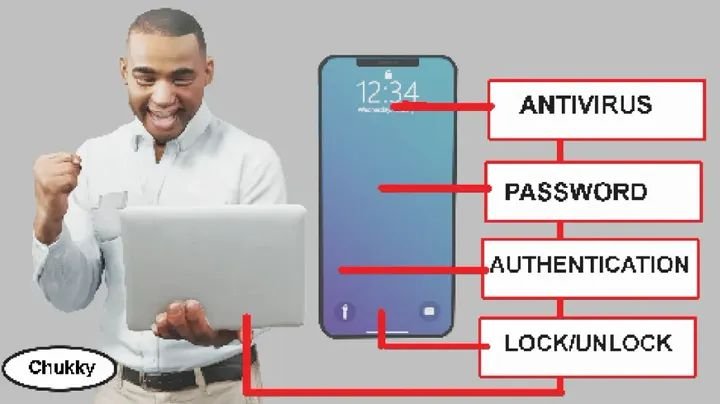
Security measures such as using strong passwords, enabling multi-factor authentication, updating applications and avoiding suspicious links can significantly improve device protection.
Understanding How Hackers Gain Access to Devices
Hackers use different techniques to compromise smartphones, computers, tablets and online accounts.
One common method is phishing, which involves fraudulent emails, text messages or websites designed to trick individuals into revealing confidential information.
Cybercriminals may impersonate banks, government agencies, telecommunications companies or popular digital platforms to make their communications appear legitimate.
Victims may be directed to fake websites where they are asked to enter passwords, banking details or verification codes. Once obtained, the information can be used to access accounts or carry out fraudulent activities.
Another method involves malicious software, commonly known as malware. Such programmes can be introduced through suspicious downloads, infected attachments, compromised websites or applications obtained from untrusted sources.
Outdated software can also expose devices to known security vulnerabilities that attackers may exploit.
These threats highlight the importance of understanding digital security and adopting preventive measures before an incident occurs.
10 Ways to Protect Your Devices from Hackers
1. Use Strong and Unique Passwords
Strong passwords remain one of the first lines of defence against unauthorised access.
Users should avoid predictable combinations involving names, birthdays, phone numbers or simple numerical sequences.
Instead, cybersecurity guidance recommends using long, unique passwords for different accounts.
Reusing the same password across several platforms creates additional risks because criminals who obtain login details from one compromised service may attempt to access other accounts using the same credentials.
Password managers can help users generate and securely store complex passwords.
2. Enable Multi-Factor Authentication
Multi-factor authentication provides an additional security layer by requiring users to verify their identity beyond entering a password.
Depending on the platform, verification may involve an authenticator application, a security key, a device confirmation or a one-time verification code.
This makes it more difficult for unauthorised individuals to access accounts, even when they have obtained a password.
The Cybersecurity and Infrastructure Security Agency (CISA) recommends multi-factor authentication as an important measure for protecting online accounts.
Users should prioritise email, banking, social media and other accounts containing sensitive information.
They should also avoid sharing verification codes with anyone claiming to represent a bank or technology company.
3. Avoid Suspicious Links and Phishing Messages
Phishing remains a significant cybersecurity threat because it exploits human trust and can be difficult to identify.
Fraudulent messages may claim that an account has been suspended, a bank transaction requires verification or an urgent security problem needs attention.
Others may promise financial rewards, employment opportunities or attractive offers to encourage recipients to click unfamiliar links.
Users should carefully examine unexpected messages before responding or opening attachments.
When a communication claims to originate from a bank or organisation, individuals should visit its official website directly instead of relying on links contained in unsolicited messages.
Requests for passwords, banking information and confidential verification codes should always be treated with caution.
4. Regularly Update Your Device Software
Software updates play an important role in protecting devices against cyberattacks.
Technology companies regularly release updates to fix security vulnerabilities, improve system performance and address weaknesses that could be exploited by attackers.
Using outdated operating systems, browsers and applications may leave devices exposed to known security risks.
Smartphone and computer users should install updates promptly and activate automatic updates where possible.
They should also ensure that applications are regularly updated through trusted application stores.
Ignoring security notifications can leave devices vulnerable for longer than necessary.
5. Download Applications From Trusted Sources
Applications downloaded from unofficial websites or unfamiliar platforms may contain malicious software.
Some cybercriminals disguise harmful applications as legitimate games, financial services, entertainment platforms or productivity tools.
Users should download applications from trusted sources, including official application stores, and examine developer information before installation.
It is also important to review application permissions.
An application requesting access to information unrelated to its purpose may present a privacy or security concern.
Users should regularly remove applications they no longer need or cannot verify.
6. Secure Your Wi-Fi Network
An unsecured Wi-Fi connection can expose connected devices to unnecessary security risks.
Individuals should protect their home internet networks with strong passwords and modern router security settings.
Changing default router login credentials is also important because publicly known default passwords can make network administration accounts easier to compromise.
Users should exercise caution when connecting to unfamiliar public Wi-Fi networks, particularly when accessing banking platforms or transmitting sensitive information.
Where necessary, a reputable Virtual Private Network (VPN) can provide additional protection for internet traffic, although it does not replace other cybersecurity measures.
7. Activate Your Phone’s Screen Lock
Physical access to a smartphone can expose personal information even without a sophisticated cyberattack.
A stolen or unattended device may provide access to emails, photographs, private messages, financial applications and social media accounts.
Users should activate screen locks through strong PINs, passwords or biometric authentication, such as fingerprint recognition and facial recognition.
They should also avoid predictable PIN combinations and limit the sensitive information displayed in notifications on locked screens.
Activating available lost-device protection features can also help users locate, lock or remotely erase missing devices.
8. Review Application Permissions and Privacy Settings
Many applications request access to personal information and device features, including contacts, photographs, microphones, cameras and location data.
While some permissions are necessary for applications to function, others may be excessive.
Users should periodically review application permissions and restrict access to information that is not necessary for an application’s operation.
For example, location access can often be limited to periods when an application is actively being used.
Reviewing privacy settings also helps individuals understand how their personal information is collected, stored and shared.
9. Back Up Important Files and Information
Cyberattacks, device theft, hardware failures and accidental deletion can result in the loss of important information.
Regular backups provide an opportunity to recover photographs, documents, business records and other essential files.
Users can consider trusted cloud storage services or external storage devices, depending on their requirements.
Backups should also be protected through strong passwords and appropriate security settings.
For businesses and individuals who depend heavily on digital information, maintaining updated backups can reduce the impact of unexpected incidents.
10. Know What to Do When Your Device Is Compromised
Recognising suspicious activity early can help limit the damage caused by a cyberattack.
Warning signs may include unfamiliar account login notifications, unexpected password-reset requests, unknown applications, unusual device behaviour or financial transactions that the user did not authorise.
However, these signs do not automatically confirm that a device has been hacked.
Anyone who suspects that an account has been compromised should use a trusted device to change the affected passwords and secure the associated email account.
Users should also review active login sessions, remove unfamiliar access and enable multi-factor authentication.
Where financial information may have been exposed, the relevant bank or financial institution should be contacted immediately.
Serious incidents may require assistance from a qualified cybersecurity professional and reporting to the appropriate authorities.
Why Cybersecurity Awareness Matters
Protecting digital devices has become increasingly important as individuals, businesses and governments rely on technology for everyday activities.
A compromised smartphone or computer can expose personal information, financial records, business communications and private conversations.
For businesses, cyberattacks can result in financial losses, operational disruptions, data breaches and reputational damage.
Across Africa, the growing use of mobile banking, digital payments, e-commerce and online communication makes cybersecurity awareness particularly important.
Individuals who understand common cyber threats are better positioned to identify suspicious activities and avoid preventable security mistakes.
However, cybersecurity is not solely an individual responsibility. Technology companies, financial institutions, telecommunications providers and governments also have important roles in protecting digital infrastructure, strengthening security systems and educating the public.
What Happens Next?
As digital technology continues to expand, cybersecurity will remain an important part of personal, business and national security.
Individuals should regularly review their device settings, update their software, strengthen passwords and remain cautious when interacting with unfamiliar online communications.
Businesses should invest in appropriate security systems, employee training, data protection measures and incident response procedures.
Although no single security measure can eliminate every cyber threat, combining different protective practices can significantly reduce the likelihood of successful attacks.
Ultimately, protecting a digital device begins with understanding the risks associated with internet use and taking responsibility for personal information.
Weng Global — Stories beyond borders.
Sources
- Cybersecurity and Infrastructure Security Agency (CISA) – Cybersecurity Best Practices.
- Federal Bureau of Investigation (FBI) – Cybersecurity Guidance.
- Federal Trade Commission (FTC) – Consumer Online Security Guidance.
- National Institute of Standards and Technology (NIST) – Digital Identity and Authentication Guidance.
- UK National Cyber Security Centre (NCSC) – Device Security Guidance.